---
title: Customer Management
description: en
---
[Skip to content](https://kb.breadboard.com/help-center/customer-management#main-content)
English - United States
Show submenu for translations
.png?width=4581&height=1022&name=Breadboard%20Logo%20-%20Color%20+%20Black%20(1).png)
- Home
- Products
- Pricing
- Blog
- Company
Open main navigation
Close main navigation
- Home
- Products
- Pricing
- Blog
- Company
- English - United States
Show submenu for translations
- Contact us
Contact us
How can we help you?
- There are no suggestions because the search field is empty.
1. [Breadboard Help Center](https://kb.breadboard.com/?hsLang=en-us)
2. [Features](https://kb.breadboard.com/features?hsLang=en-us)
# Customer Management
### Management
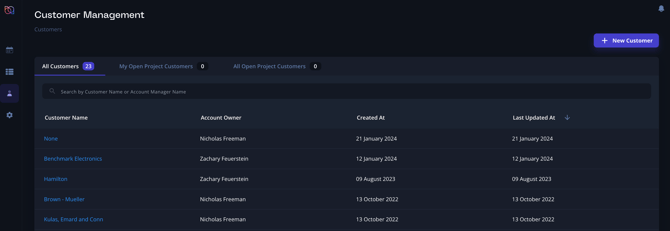
The **Customers** feature allows you to manage all your customer information in one centralized location. This includes company information, contact details, and project associations.
### How to Manage Customers
1. **Accessing the Feature**:
- Navigate to the "Customers" tab from the main dashboard.
1. **Add New Customer**:
- Click on the "Add Customer" button.
- Fill in the necessary information such as customer name, contact details, and any relevant notes.
- Save the information to add the customer to your database.
2. **Edit Customer Information**:
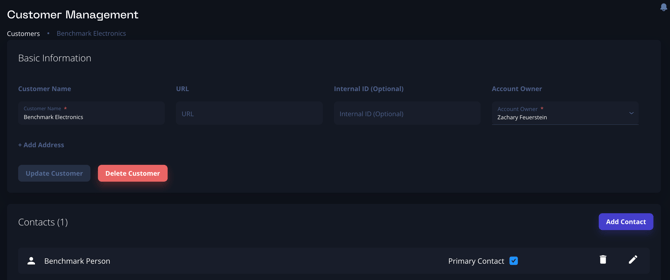
- Select a customer from the list.
- Click on the "Edit" button to update contact details, notes, or any other relevant information.
### Bulk Upload
1. **Contacting Support** ([support@breadboard.com](mailto:support@breadboard.com)):
- If you have a large amount of customer data to upload, contact Breadboard support for assistance.
- The following information is helpful when uploading a list of customers:
- Customer Internal ID
- Customer Name
- Customer URL
- Contact First Name
- Contact Last Name
- Contact Phone Number
- Contact Email Address
- Contact Title
- Contact Internal ID
- Provide the support team with the data files in the required format.
2. **Backend Upload**:
- The support team will assist in uploading the data through the backend, ensuring all information is correctly imported and formatted.
3. **Verification**:
- After the upload, verify the data to ensure accuracy and completeness.
- [Getting started](https://kb.breadboard.com/getting-started?hsLang=en-us)
- [General](https://kb.breadboard.com/general?hsLang=en-us)
- [FAQs](https://kb.breadboard.com/faqs?hsLang=en-us)
- [RFQs](https://kb.breadboard.com/rfqs?hsLang=en-us)
- [Settings](https://kb.breadboard.com/settings?hsLang=en-us)
- [Supplier Setup](https://kb.breadboard.com/supplier-setup?hsLang=en-us)
- [Features](https://kb.breadboard.com/features?hsLang=en-us)
- Home
- Products
- Pricing
- Blog
- Company
[.png?width=4581&height=1022&name=Breadboard%20Logo%20-%20Color%20+%20Black%20(1).png)](http://www.breadboard.com)
[mailto:email@email.com](mailto:email@email.com)
Copyright © 2026, www.eetech.com